
EzyHTTP (Easy going to HTTP Interaction)
Back To BlogsTrong việc phát triển ứng dụng web và microservice, việc tạo các API HTTP nhanh chóng và đồng bộ đóng vai trò quan trọng. EzyHTTP được tạo ra như một công cụ hỗ trợ tính hợp nhanh chóng giữa client và sever HTTP. Trong bài viết này sẽ tìm hiểu cách sử dụng EzyHTTP để xây dựng một ứng dụng HTTP sever đơn giản kết nối client.
1. EzyHTTP là gì?
EzyHTTP (Easy going to HTTP Interaction) là một framework hỗ trợ tương tác với HTTP, bao gồm cả máy chủ HTTP và máy khách HTTP. Framework này giúp lưu lượng yêu cầu một cách trơn tru từ máy khách tới máy chủ mà không cần quan tâm đến việc quản lý HttpServlet, HttpRequest hay HttpResponse.
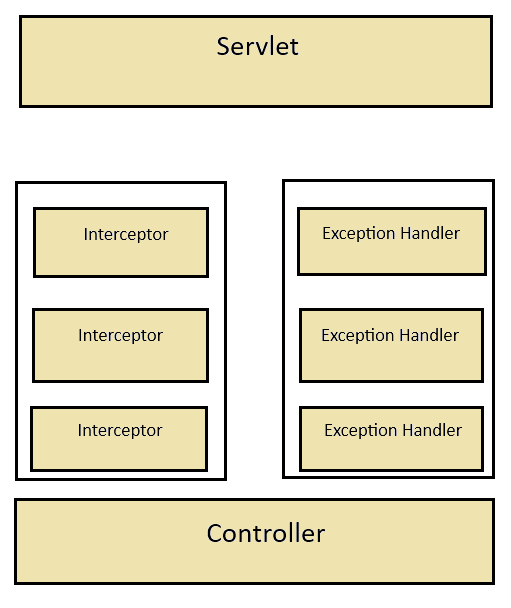
EzyHTTP Server được tổ chức như sau:
- Khi client gửi yêu cầu, Servlet sẽ nhận yêu cầu đầu tiên.
- Yêu cầu sẽ đi qua danh sách các interceptor trước khi được xử lý bởi controller.
- Controller xử lý yêu cầu và trả phản hồi về Servlet.
- Nếu có ngoại lệ chưa được xử lý bởi Interceptor hoặc Controller, ExceptionHandler sẽ tiếp nhận và trả kết quả cho Servlet.
- Cuối cùng, Servlet gửi phản hồi đến client.
2. Cài đặt EzyHTTP
Để sử dụng EzyHTTP, bạn cần thêm các dependency vào file pom.xml của dự án Maven:
<dependency>
    <groupId>com.tvd12</groupId>
    <artifactId>ezyhttp-server-boot</artifactId>
    <version>1.3.3</version>
</dependency>
<dependency>
    <groupId>com.tvd12</groupId>
    <artifactId>ezyhttp-client</artifactId>
    <version>1.3.3</version>
</dependency>
Hoặc các phiên bản khác tại đây
3. Ví dụ sử dụng HTTP server
Chúng ta sẽ tạo một ứng dụng HTTP server quản lý người dùng với hai API chính:
api/v1/users/add: Thêm người dùng vào hệ thống.api/v1/users/{username}: Lấy thông tin người dùng theo tên.- Tạo entry point cho ứng dụng
package org.hello;

import com.tvd12.ezyhttp.server.boot.EzyHttpApplicationBootstrap;
import com.tvd12.ezyhttp.server.core.asm.RequestHandlerImplementer;
public class App {
    public static void main(String[] args) throws Exception {
        RequestHandlerImplementer.setDebug(true);
        EzyHttpApplicationBootstrap.start(App.class);
    }
}
- Tạo class User để lưu thông tin người dùng
package org.hello;

import lombok.AllArgsConstructor;
import lombok.Getter;
import lombok.NoArgsConstructor;
import lombok.Setter;

@Getter
@Setter
@NoArgsConstructor
@AllArgsConstructor
public class User {
    protected String username;
    protected String password;
}
- Tạo UserService để quản lý người dùng
package org.hello;

import com.tvd12.ezyfox.bean.annotation.EzySingleton;

import java.util.concurrent.ConcurrentHashMap;
import java.util.Map;
@EzySingleton
public class UserService {
    protected final Map<String, User> users = new ConcurrentHashMap<>();

    public User addUser(User user) {
        return users.put(user.getUsername(), user);
    }

    public User getUser(String username) {
        return users.get(username);
    }
}
- Tạo UserController để xử lý yêu cầu
package org.hello;

import com.tvd12.ezyfox.bean.annotation.EzyAutoBind;
import com.tvd12.ezyhttp.core.exception.HttpConflictException;
import com.tvd12.ezyhttp.core.exception.HttpNotFoundException;
import com.tvd12.ezyhttp.core.response.ResponseEntity;
import com.tvd12.ezyhttp.server.core.annotation.*;
import lombok.Setter;
@Setter
@Controller("/api/v1/users")
public class UserController {
    @EzyAutoBind
    protected UserService userService;

    @DoPost("/add")
    public ResponseEntity addUser(@RequestBody User user) {
        User existed = userService.addUser(user);
        if (existed == null)
            return ResponseEntity.ok(Boolean.TRUE);
        throw new HttpConflictException("user: " + user.getUsername() + " existed");
    }

    @DoGet("/{username}")
    public User getUser(@PathVariable("username") String username) {
        User user = userService.getUser(username);
        if (user != null)
            return user;
        throw new HttpNotFoundException("user: " + username + " not found");
    }
}
- Khởi động class chính
Appđể bắt đầu server.
4. Tạo ứng dụng client
EzyHTTP hỗ trợ hai cách gửi yêu cầu HTTP:- HttpClient: Đơn giản, hỗ trợ đồng bộ.
- HttpClientProxy: Hỗ trợ cả đồng bộ và bất đồng bộ.
Kiểm Thử Với HttpClient:
- Cần tạo một lớp
ApiAddUserTestvới nội dung:
package org.hello.test;

import org.hello.User;
import com.tvd12.ezyhttp.client.HttpClient;
import com.tvd12.ezyhttp.client.request.PostRequest;
import com.tvd12.ezyhttp.client.request.Request;
import com.tvd12.ezyhttp.client.request.RequestEntity;
import com.tvd12.ezyhttp.core.constant.StatusCodes;

public class ApiAddUserTest {
    public static void main(String[] args) throws Exception {
        HttpClient httpClient = HttpClient.builder().build();

        User body = new User();
        body.setUsername("dev");
        body.setPassword("123456");

        RequestEntity entity = RequestEntity.body(body);

        Request request = new PostRequest()
                .setURL("http://localhost:8080/api/v1/users/add")
                .setEntity(entity)
                .setResponseType(Boolean.class)
                .setResponseType(StatusCodes.CONFLICT, String.class);

        Boolean response = httpClient.call(request);
        System.out.println("add user response: " + response);
    }
}
- Cần tạo một lớp ApiAddUserTest với nội dung:
package org.hello.test;

import com.tvd12.ezyhttp.client.HttpClientProxy;
import com.tvd12.ezyhttp.client.request.GetRequest;
import com.tvd12.ezyhttp.client.request.Request;
import com.tvd12.ezyhttp.client.request.RequestEntity;
import com.tvd12.ezyhttp.core.constant.StatusCodes;

public class ApiGetUserTest {
    public static void main(String[] args) throws Exception {
        HttpClientProxy httpClient = HttpClientProxy.builder().build();
        httpClient.start();

        RequestEntity entity = RequestEntity.builder().build();

        Request request = new GetRequest()
                .setURL("http://localhost:8080/api/v1/users/dev")
                .setEntity(entity)
                .setResponseType(String.class)
                .setResponseType(StatusCodes.NOT_FOUND, String.class);

        String response = httpClient.call(request, 10000);
        System.out.println("get user response: " + response);
    }
}
- Chạy thử và thấy:
get user response: {"username":"dev","password":"123456"}