
EzyJPA (Easy going to JPA Interaction)
Back To BlogsLàm việc với cơ sở dữ liệu là một phần không thể thiếu trong lập trình. Tuy nhiên sử dụng JPA truyền thống có thể gây ra nhiều khó khăn với các thao tác ánh xạ dữ liệu phức tạp và các truy vấn dài dòng. EzyJPA ra đời nhằm giải quyết những vấn đề này, mang đến cho lập trình viên một công cụ linh hoạt và dễ sử dụng để tương tác với JPA. Hãy cùng khám phá cách EzyJPA có thể giúp bạn tối ưu hóa công việc của mình qua bài viết này.
1. EzyJPA là gì?
EzyJPA (Easy going to JPA Interaction) là một framework mạnh mẽ giúp đơn giản hóa việc làm việc với JPA (Java Persistence API). Với EzyJPA, bạn có thể:
- Tự động ánh xạ các thực thể Java với bản ghi cơ sở dữ liệu và ngược lại.
- Dễ dàng thực hiện các thao tác truy vấn, cập nhật, xóa và tổng hợp thông qua chuỗi truy vấn.
- Sử dụng các annotation để tùy chỉnh và định nghĩa hành vi.
2. Cấu trúc của EzyJPA
EzyJPA được thiết kế với các thành phần chính sau:
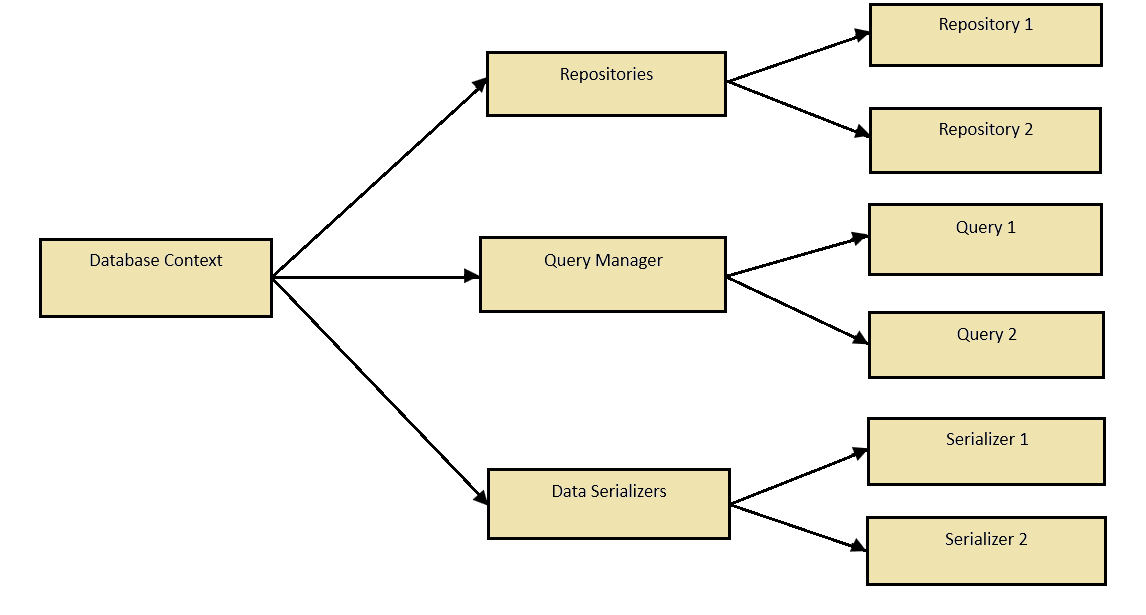
- Database Context: Bao bọc EntityManager và DataBinding. Quản lý các repositories, QueryManager và DataSerializers. Cung cấp các hàm để truy cập chúng một cách dễ dàng.
- Repositories: Quản lý các kho lưu trữ dữ liệu theo tên và kiểu dữ liệu.
- QueryManager: Thu thập và quản lý các truy vấn từ annotations và các truy vấn được nhà phát triển định nghĩa.
- DataSerializers: Quản lý các bộ serialize và deserialize dữ liệu, cho phép tùy chỉnh theo nhu cầu cụ thể.
- Repository: Thực hiện chuyển đổi truy vấn, dữ liệu và gửi các lệnh tới cơ sở dữ liệu.
3. Cài đặt EzyJPA
- Thêm Dependency
Để bắt đầu sử dụng EzyJPA, cần thêm dependency vào dự án của mình:
<dependency>
    <groupId>com.tvd12</groupId>
    <artifactId>ezydata-jpa</artifactId>
    <version>1.2.9</version>
</dependency>
Hoặc các phiên bản khác tại đây
- Cấu hình để tạo repositories
Cách dễ nhất là sử dụng
ezyfox-boot-autoconfigure bằng cách thêm dependency sau:
<dependency>
    <groupId>com.tvd12</groupId>
    <artifactId>ezyfox-boot-autoconfigure</artifactId>
    <version>1.1.1</version>
</dependency>
Nếu không thể sử dụng
ezyfox-boot-autoconfigure, có thể tự cấu hình như sau:import com.tvd12.ezydata.database.EzyDatabaseContext; import com.tvd12.ezydata.jpa.EzyJpaDatabaseContextBuilder; import com.tvd12.ezydata.jpa.loader.EzyJpaDataSourceLoader; import com.tvd12.ezydata.jpa.loader.EzyJpaEntityManagerFactoryLoader; public class EzyJpaConfiguration { public void config() { EzyDatabaseContext context = new EzyJpaDatabaseContextBuilder() .properties(properties) .entityManagerFactory(entityManagerFactory()) .scan("your_package_to_scan") .build(); } private EntityManagerFactory entityManagerFactory() { return new EzyJpaEntityManagerFactoryLoader() .entityPackages(packagesToScan) .dataSource(dataSource()) .load("Default"); } private DataSource dataSource() { return new EzyJpaDataSourceLoader() .properties(properties, "datasource") .load(); } }
- Cấu hình tệp ứng dụng
Cần thêm các thông tin cấu hình trong configuration file như sau:
Với
application.yaml:datasource: jdbcUrl: jdbc:mysql://root:12345678@localhost:3306/test driverClassName: com.mysql.cj.jdbc.Driver
Với
application.properties:datasource.jdbcUrl=jdbc:mysql://root:12345678@localhost:3306/test datasource.driverClassName=com.mysql.cj.jdbc.Driver
4. Ví dụ sử dụng EzyJPA
- Tạo các lớp thực thể
@Data
@Entity
@Table(name = "employees")
@NoArgsConstructor
@AllArgsConstructor
@EqualsAndHashCode(of = "id")
public class Employee implements Serializable {

    @Id
    @GeneratedValue(strategy = GenerationType.IDENTITY)
    private int id;

    @Column(name = "name", nullable = false)
    private String name;

    @Column(name = "salary", nullable = false)
    private double salary;

    @Column(name = "workingdays", nullable = false)
    private double workingdays;

    @Column(name = "receipt", nullable = false)
    private double receipt;

    @Column(name = "payment", nullable = false)
    private double payment;
}
- Tạo repositories
@EzyRepository
public interface EmployeeRepository extends EzyDatabaseRepository<Integer, Employee> {
    void deleteById(Integer id);
}
- Thực hiện truy vấn dữ liệu
public void deleteEmployee(int id) {
        Employee employee = employeeRepository.findById(id);
        if (employee != null) {
            employeeRepository.deleteById(id);
            logger.info("Deleted employee with ID: {}", id);
        } else {
            logger.warn("Employee not found with ID: {}", id);
        }
    }
5. Tóm lại
EzyJPA mang lại một giải pháp linh hoạt, hiệu quả và dễ sử dụng để làm việc với cơ sở dữ liệu trong các dự án Java. Bằng cách tự động hóa các thao tác ánh xạ và xử lý truy vấn, framework này giúp giảm thiểu đáng kể khối lượng mã nguồn phải viết, đồng thời tăng năng suất và chất lượng công việc.
Nếu bạn đang tìm kiếm một công cụ giúp tập trung vào nghiệp vụ thay vì các chi tiết kỹ thuật phức tạp, EzyJPA chính là lựa chọn hoàn hảo.