
EzyPlatform Low Code: Hiển thị danh sách bài viết
Back To Blogs
Post by:
 Young Monkeys - Founder
Young Monkeys - Founder
Date:
1779800770000
Sau khi đã tạo được một trang giới thiệu sản phẩm bây giờ bạn đã quen với EzyPlatform low code rồi, bây giờ bạn có thể hiện thị danh sách các bài viết, điều này rất tốt cho Inbound marketing.
Chuẩn bị môi trường
Một lần nữa hãy đàm bảo bạn đã Cài đặt công cụ lập trình EzyArticle visual studio code extension rồi, và bạn cũng đã đồng bộ các page fragment về Visual Studio Code (VS Code) rồi.
Bổ sung mã nguồn
Bây giờ ở thư mục
page-fragments/posts/content bạn hãy bổ sung mã nguồn cho các tập tin lần lượt như sau:Tập tin content.html
<section class="posts-content-section">
    <div class="container">
        <div class="posts-content-list" id="postListBody">
            <article th:each="post : " class="posts-content-card">
                <a class="posts-content-image-link"
                   th:href="'/' + post.slug">
                    <img class="posts-content-image"
                         th:src="'/images/logo.png'"
                         th:alt="">
                </a>
                <div class="posts-content-body">
                    <div th:if="" class="posts-content-terms">
                        <a th:each="term : "
                           class="posts-content-term"
                           th:href="'/posts?term=' + "
                           th:text="">
                        </a>
                    </div>
                    <a class="posts-content-title-link"
                       th:href="'/' + post.slug">
                        <h2 class="posts-content-title" th:text=""></h2>
                    </a>
                    <p class="posts-content-summary" th:if="" th:text=""></p>
                    <div class="posts-content-meta">
                        <a th:if=""
                           class="posts-content-author-avatar-link"
                           th:href="">
                            <img class="posts-content-author-avatar"
                                 th:src="'/images/logo.png'"
                                 th:alt="">
                        </a>
                        <div th:if="" class="posts-content-author-avatar posts-content-author-avatar-placeholder">
                            <i class="fa-solid fa-user"></i>
                        </div>
                        <div class="posts-content-author-info">
                            <div class="posts-content-author-line">
                                <a th:if=""
                                   class="posts-content-author-name"
                                   th:href=""
                                   th:text="">
                                </a>
                                <span th:if="" class="posts-content-author-name">[[#{unknown_author}]]</span>
                                <span class="posts-content-date">
                                    <span class="date-string" th:text=""></span>
                                </span>
                            </div>
                            <div th:if=""
                                 class="posts-content-author-title"
                                 th:text="">
                            </div>
                        </div>
                    </div>
                </div>
            </article>
        </div>
        <div th:if="" class="posts-content-load-more" id="nextButtonContainer">
            <button type="button" class="btn btn-outline-primary px-5" onclick="fetchPostList('next')">
                [[#{load_mores}]]
            </button>
        </div>
    </div>
</section>
Tập tin foot.hml
<script th:inline="javascript">
/*<![CDATA[*/
var postSearchTerm = /*[[]]*/ '';
var postSearchKeyword = new URLSearchParams(window.location.search).get('keyword') || '';
var lastPostPageToken = {};
lastPostPageToken.next = /*[[]]*/ '';
ezyweb.messages.date = /*[[#{date}]]*/ '';
ezyweb.messages.unknown_author = /*[[#{unknown_author}]]*/ '';
/*]]>*/

//================ search ================
var onKeydownToSearchPostItems = function(e) {
    if (event.key === 'Enter') {
        postSearchKeyword = $(e).val();
        fetchPostList();
        changeBrowserUrl();
    }
}

var changeBrowserUrl = function() {
    var params = [];
    if (postSearchTerm) {
        params.push('term=' + encodeURIComponent(postSearchTerm));
    }
    if (postSearchKeyword) {
        params.push('keyword=' + encodeURIComponent(postSearchKeyword));
    }
    if (ezyweb.lang) {
        params.push('lang=' + encodeURIComponent(ezyweb.lang));
    }
    var url = location.pathname;
    if (params.length) {
        url += '?' + params.join('&');
    }
    window.history.pushState({}, '', url);
}

//================ post list ================
var fetchPostList = function(action) {
    var queryString = '';
    if (postSearchTerm) {
        queryString += '&term=' + encodeURIComponent(postSearchTerm);
    }
    if (postSearchKeyword) {
        queryString += '&keyword=' + encodeURIComponent(postSearchKeyword);
    }
    if (action == 'next') {
        if (lastPostPageToken.next) {
            queryString += '&nextPageToken=' + lastPostPageToken.next;
        } else {
            return;
        }
    }
    if (ezyweb.lang) {
        queryString += '&lang=' + encodeURIComponent(ezyweb.lang);
    }
    $.ajax({
        url: '/api/v1/posts?limit=12' + queryString,
        type: 'GET',
        dataType: 'json'
    })
    .done(function(data) {
        lastPostPageToken = data.pageToken;
        var html = buildPostListBodyHtml(data.items);
        if (action == 'next') {
            $('#postListBody').append(html);
        } else {
            $('#postListBody').html(html);
        }
        if (!data.continuation.hasNext) {
            $('#nextButtonContainer').remove();
        }
    })
    .fail(function(e) {
        ezyweb.processGetApiErrors(e);
    });
}

var buildPostListBodyHtml = function(postList) {
    var html = '';
    postList.forEach(function(post) {
        html += buildPostListItemHtml(post);
    });
    return html;
}

var buildPostListItemHtml = function(post) {
    var postUrl = getPostUrl(post);
    var title = ezyweb.escapeHtml(post.title || '');
    var shortedContent = ezyweb.escapeHtml(post.shortedContent || '');
    var featuredImageUrl = ezyweb.extractMediaUrl(post.featuredImage) || '/images/logo.png';
    var author = post.author || {};
    var authorName = ezyweb.escapeHtml(author.name || author.displayName || ezyweb.messages.unknown_author || '');
    var authorUrl = author.uuid ? '/posts?author=' + encodeURIComponent(author.uuid) : '';
    var authorAvatarUrl = ezyweb.extractMediaUrl(post.authorAvatar) || '/images/logo.png';
    var authorTitle = ezyweb.escapeHtml(post.authorTitle || '');
    var publishedAt = post.publishedAt
        ? ezyweb.formatTimeStamp(post.publishedAt, 'YYYY-MM-DD')
        : '';
    var termsHtml = buildPostTermsHtml(post.terms || []);
    var authorAvatarHtml = authorUrl
        ? `
            <a class="posts-content-author-avatar-link" href="">
                <img class="posts-content-author-avatar" src="" alt="">
            </a>
            `
        : `
            <div class="posts-content-author-avatar posts-content-author-avatar-placeholder">
                <i class="fa-solid fa-user"></i>
            </div>
            `;
    var authorNameHtml = authorUrl
        ? `<a class="posts-content-author-name" href=""></a>`
        : `<span class="posts-content-author-name"></span>`;
    var authorTitleHtml = authorTitle
        ? `<div class="posts-content-author-title"></div>`
        : '';
    return `
        <article class="posts-content-card">
            <a class="posts-content-image-link" href="">
                <img class="posts-content-image" src="" alt="">
            </a>
            <div class="posts-content-body">

                <a class="posts-content-title-link" href="">
                    <h2 class="posts-content-title"></h2>
                </a>
                <p class="posts-content-summary"></p>
                <div class="posts-content-meta">

                    <div class="posts-content-author-info">
                        <div class="posts-content-author-line">

                            <span class="posts-content-date">
                                <span class="date-string"></span>
                            </span>
                        </div>

                    </div>
                </div>
            </div>
        </article>
        `;
}

var buildPostTermsHtml = function(terms) {
    if (!terms.length) {
        return '';
    }
    var html = '<div class="posts-content-terms">';
    terms.forEach(function(term) {
        var termName = ezyweb.escapeHtml(term.name || '');
        var termSlug = encodeURIComponent(term.slug || '');
        html += `
            <a class="posts-content-term" href="/posts?term=">

            </a>
            `;
    });
    html += '</div>';
    return html;
}

var getPostUrl = function(post) {
    return post.type == 'POST'
        ? '/posts/' + post.slug
        : '/' + post.slug;
}

</script>
Tập tin head.html
<style>
.posts-content-section {
    padding: 28px 0;
}

.posts-content-list {
    display: grid;
    gap: 24px;
}

.posts-content-card {
    display: grid;
    grid-template-columns: minmax(220px, 34%) 1fr;
    gap: 22px;
    padding: 18px;
    border: 1px solid #e6e8ec;
    border-radius: 8px;
    background: #fff;
}

.posts-content-image-link {
    display: block;
    overflow: hidden;
    border-radius: 8px;
    background: #f4f6f8;
}

.posts-content-image {
    display: block;
    width: 100%;
    aspect-ratio: 16 / 10;
    object-fit: cover;
}

.posts-content-body {
    min-width: 0;
}

.posts-content-terms {
    display: flex;
    flex-wrap: wrap;
    gap: 8px;
    margin-bottom: 10px;
}

.posts-content-term {
    display: inline-flex;
    align-items: center;
    min-height: 26px;
    padding: 3px 10px;
    border-radius: 999px;
    background: #eef5ff;
    color: #0b66c3;
    font-size: 13px;
    font-weight: 600;
    line-height: 1.3;
    text-decoration: none;
}

.posts-content-title-link {
    color: inherit;
    text-decoration: none;
}

.posts-content-title {
    margin: 0;
    color: #171a1f;
    font-size: 26px;
    font-weight: 700;
    line-height: 1.25;
}

.posts-content-summary {
    display: -webkit-box;
    margin: 12px 0 0;
    overflow: hidden;
    color: #525866;
    font-size: 16px;
    line-height: 1.65;
    -webkit-box-orient: vertical;
    -webkit-line-clamp: 3;
}

.posts-content-meta {
    display: flex;
    align-items: center;
    gap: 12px;
    margin-top: 18px;
}

.posts-content-author-avatar-link {
    flex: 0 0 auto;
}

.posts-content-author-avatar {
    display: flex;
    align-items: center;
    justify-content: center;
    width: 44px;
    height: 44px;
    border-radius: 50%;
    object-fit: cover;
    background: #edf0f3;
    color: #68707d;
}

.posts-content-author-info {
    min-width: 0;
}

.posts-content-author-line {
    display: flex;
    flex-wrap: wrap;
    align-items: center;
    gap: 8px;
    color: #6b7280;
    font-size: 14px;
    line-height: 1.4;
}

.posts-content-author-name {
    color: #171a1f;
    font-weight: 700;
    text-decoration: none;
}

.posts-content-date::before {
    content: "/";
    margin-right: 8px;
    color: #a0a7b2;
}

.posts-content-author-title {
    margin-top: 2px;
    color: #747b88;
    font-size: 13px;
    line-height: 1.4;
}

.posts-content-load-more {
    display: flex;
    justify-content: center;
    padding: 28px 0 6px;
}

@media (max-width: 767.98px) {
    .posts-content-section {
        padding: 18px 0;
    }

    .posts-content-card {
        grid-template-columns: 1fr;
        gap: 16px;
        padding: 14px;
    }

    .posts-content-title {
        font-size: 22px;
    }
}
</style>
Bây giờ bạn hãy đồng bộ mã nguồn này lên máy chủ bằng cách chuột phải vào thư mực
page-fragments/posts/content vào chọn Publish Content To Server.Bởi vì cần hiển thị thời gian đăng bài nên chúng ta sẽ cần bổ sung thư viện
moment. Bạn hãy bổ sung thư viện này phía sau thư viện jquery bằng cách mở tập tin page-fragments/common/scripts/content.html và bổ sung đoạn mã:<script src="https://cdnjs.cloudflare.com/ajax/libs/moment.js/2.29.4/moment.min.js" crossorigin="anonymous" referrerpolicy="no-referrer"></script>
Vào phía sau đoạn mã của jquery:
<script src="https://ajax.googleapis.com/ajax/libs/jquery/3.6.4/jquery.min.js"></script>
Bây giờ bạn hãy chuột phải vào tập tin
content.html và chọn Publish Content To Server.Xem kết quả
Bây giờ bạn có thể truy cập vào web của mình với URL là
url-website-của-bạn/posts ví dụ của tôi là: https://freestyle.ezyplatform.com/posts.Hãy đảm bảo bạn đã thêm các bài viết rồi, nếu bạn chưa biết thêm bài viết thế nào, bạn hãy tham khảo Hướng dẫn này. Kết quả bạn nhận được có thể như sau: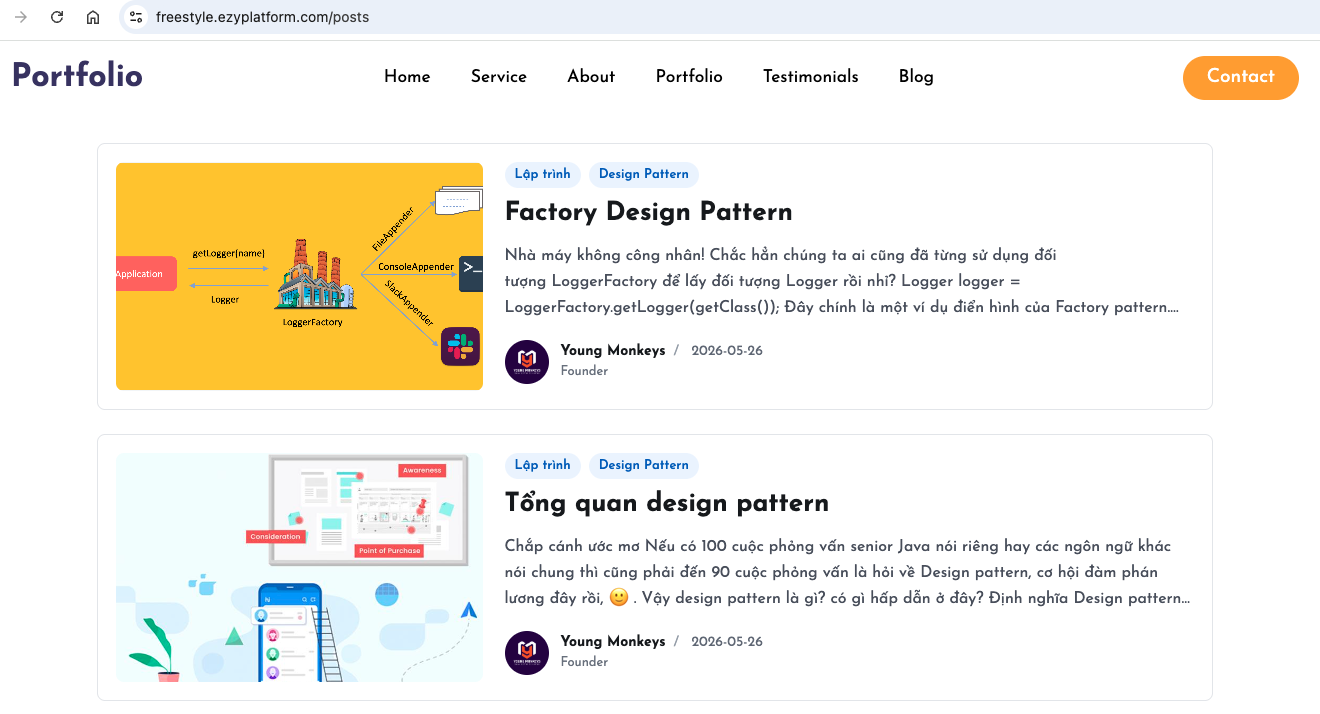
Gắn link các bài viết
Sau khi hoàn thiện giao diện các bài viết hoàn chỉnh, bạn có thể gắn link
/posts vào bất cứ đâu bạn muốn, ví dụ bạn sẽ gắn vào phần đầu trang. Bạn có thể mở tập tin page-fragements/common/header/content.html và cập nhật từ:<a class="nav-link" href="#blog">Blog</a>
Sang:
<a class="nav-link" href="/posts">Blog</a>
Sau đó bạn hãy chuột phải và chọn
Publish Content To Server.Khi quay lại web và refresh lại trang, bạn sẽ thấy khi click vào menu
Blog nó sẽ hiện ra danh sách bài viết.Sử dụng AI để chỉnh sửa
Bạn có thể gõ prompt để yêu cầu AI chỉnh sửa bố cục hoặc giao diện theo ý mình từ mã nguồn cơ bản mà tôi đã cung cấp.
Gợi ý
Tiếp tục theo dõi Loat bài viết Low code với EzyPlatform của chúng tôi để nhận được thêm các hướng dẫn hữu ích nhé.


