
EzyPlatform Low Code: Hiển thị chi tiết bài viết
Back To Blogs
Post by:
 Young Monkeys - Founder
Young Monkeys - Founder
Date:
1779872424000
Sau khi đã hiển thị được danh sách bài viết bây giờ bạn có thể hiển thị chi tiết bài viết để khi người dùng nhất vào xem bài viết có thể thấy.
Chuẩn bị môi trường
Hãy đảm bảo bạn đã nâng cấp ezyplatform các plugin và theme freestyle lên phiên bản mới nhất.
Bổ sung mã nguồn
Bây giờ ở thư mục
page-fragments/post_details/content bạn hãy bổ sung mã nguồn cho các tập tin lần lượt như sau:Tập tin content.html
<section class="post-details-section" th:if="">
    <div class="container">
        <article class="post-details-article">
            <a class="post-details-back-link" href="/posts">
                <i class="fa-solid fa-arrow-left"></i>
                <span>Trở lại Blog</span>
            </a>
            <div th:if="" class="post-details-terms">
                <a th:each="term : "
                   class="post-details-term"
                   th:href="'/posts?term=' + "
                   th:text="">
                </a>
            </div>
            <h1 class="post-details-title" th:text=""></h1>
            <div class="post-details-author">
                <a th:if=""
                   class="post-details-author-avatar-link"
                   th:href="">
                    <img class="post-details-author-avatar"
                         th:src="'/images/logo.png'"
                         th:alt="">
                </a>
                <div th:if="" class="post-details-author-avatar post-details-author-avatar-placeholder">
                    <i class="fa-solid fa-user"></i>
                </div>
                <div class="post-details-author-info">
                    <a th:if=""
                       class="post-details-author-name"
                       th:href=""
                       th:text="">
                    </a>
                    <span th:if="" class="post-details-author-name">[[#{unknown_author}]]</span>
                    <div th:if=""
                         class="post-details-author-title"
                         th:text="">
                    </div>
                </div>
            </div>
            <div class="post-details-content" th:utext=""></div>
        </article>
    </div>
</section>
Tập tin head.html
<style>
.post-details-section {
    padding: 32px 0 56px;
    background: #ffffff;
}

.post-details-article {
    max-width: 860px;
    margin: 0 auto;
}

.post-details-back-link {
    display: inline-flex;
    align-items: center;
    gap: 8px;
    margin-bottom: 24px;
    color: #0b66c3;
    font-size: 15px;
    font-weight: 700;
    line-height: 1.4;
    text-decoration: none;
}

.post-details-back-link:hover {
    color: #084f96;
    text-decoration: none;
}

.post-details-terms {
    display: flex;
    flex-wrap: wrap;
    gap: 8px;
    margin-bottom: 16px;
}

.post-details-term {
    display: inline-flex;
    align-items: center;
    min-height: 28px;
    padding: 4px 11px;
    border-radius: 999px;
    background: #eef5ff;
    color: #0b66c3;
    font-size: 13px;
    font-weight: 700;
    line-height: 1.3;
    text-decoration: none;
}

.post-details-term:hover {
    color: #084f96;
    text-decoration: none;
}

.post-details-title {
    margin: 0;
    color: #171a1f;
    font-size: 42px;
    font-weight: 800;
    line-height: 1.18;
}

.post-details-author {
    display: flex;
    align-items: center;
    gap: 14px;
    margin-top: 22px;
    padding-bottom: 28px;
    border-bottom: 1px solid #e6e8ec;
}

.post-details-author-avatar-link {
    flex: 0 0 auto;
}

.post-details-author-avatar {
    display: flex;
    align-items: center;
    justify-content: center;
    width: 52px;
    height: 52px;
    border-radius: 50%;
    object-fit: cover;
    background: #edf0f3;
    color: #68707d;
}

.post-details-author-info {
    min-width: 0;
}

.post-details-author-name {
    display: inline-block;
    color: #171a1f;
    font-size: 16px;
    font-weight: 800;
    line-height: 1.35;
    text-decoration: none;
}

.post-details-author-name:hover {
    color: #0b66c3;
    text-decoration: none;
}

.post-details-author-title {
    margin-top: 3px;
    color: #6b7280;
    font-size: 14px;
    line-height: 1.45;
}

.post-details-content {
    margin-top: 30px;
    color: #2f3540;
    font-size: 17px;
    line-height: 1.8;
}

.post-details-content > *:first-child {
    margin-top: 0;
}

.post-details-content > *:last-child {
    margin-bottom: 0;
}

.post-details-content img,
.post-details-content video,
.post-details-content iframe {
    max-width: 100%;
}

.post-details-content img {
    height: auto;
    border-radius: 8px;
}

.post-details-content h1,
.post-details-content h2,
.post-details-content h3,
.post-details-content h4,
.post-details-content h5,
.post-details-content h6 {
    margin: 1.6em 0 0.65em;
    color: #171a1f;
    font-weight: 800;
    line-height: 1.28;
}

.post-details-content p,
.post-details-content ul,
.post-details-content ol,
.post-details-content blockquote,
.post-details-content pre,
.post-details-content table {
    margin-bottom: 1.15em;
}

.post-details-content a {
    color: #0b66c3;
}

.post-details-content blockquote {
    padding: 12px 18px;
    border-left: 4px solid #0b66c3;
    background: #f6f9fc;
    color: #424a57;
}

.post-details-content pre {
    padding: 16px;
    overflow: auto;
    border-radius: 8px;
    background: #111827;
    color: #f9fafb;
}

.post-details-content table {
    width: 100%;
}

@media (max-width: 767.98px) {
    .post-details-section {
        padding: 22px 0 38px;
    }

    .post-details-title {
        font-size: 31px;
    }

    .post-details-author {
        align-items: flex-start;
        padding-bottom: 22px;
    }

    .post-details-content {
        font-size: 16px;
        line-height: 1.75;
    }
}
</style>
Bây giờ bạn hãy đồng bộ mã nguồn này lên máy chủ bằng cách chuột phải vào thư mực
page-fragments/post_details/content vào chọn Publish Content To Server.Xem kết quả
Bây giờ bạn có thể truy cập vào web của mình với URL là
url-website-của-bạn/posts/slug-bài-viết ví dụ của tôi là: https://freestyle.ezyplatform.com/posts/tong-quan-design-pattern.Kết quả bạn nhận được có thể như sau: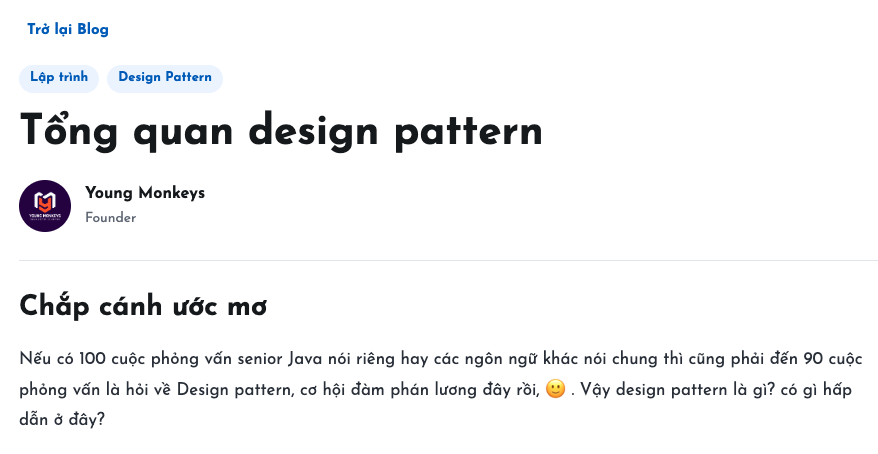
Sử dụng AI để chỉnh sửa
Bạn có thể gõ prompt để yêu cầu AI chỉnh sửa bố cục hoặc giao diện theo ý mình từ mã nguồn cơ bản mà tôi đã cung cấp.
Gợi ý
Tiếp tục theo dõi Loat bài viết Low code với EzyPlatform của chúng tôi để nhận được thêm các hướng dẫn hữu ích nhé.


