
Cách Ezytank đồng bộ dữ liệu mô phỏng dùng ECS với phần hiển thị dùng GameObject
Back to ezytankDự án ezytank-unity dùng cách tiếp cận lai (hybrid): ECS xử lý phần mô phỏng, GameObject xử lý phần hiển thị. Gói
Unity.NetCode.Hybrid sẽ tự động đồng bộ hai phần này.Mô phỏng và hiển thị
- Mô phỏng (ECS): Entity, component (Tank, Shell, LocalToWorld) và system (TankMoveSystem, ShootSystem) quản lý logic và trạng thái, chạy ở cả server và client.
- Hiển thị (GameObject): Các MonoBehaviour, MeshRenderer, ParticleSystem... dùng để hiển thị game cho người chơi, chỉ chạy ở client.
Khi entity thay đổi vị trí trong ECS, thành phần
Transform của GameObject tương ứng cũng phải thay đổi theo.
Quy trình cài đặt:
- Prefab trung tâm -
GameResourcesAuthoring.cs: Script này giữ tham chiếu đến prefabs (ví dụtankGhostPrefabs,shellGhost), và khi bake ECS, prefab được đưa vào component ECS để các system có thể truy cập.using Unity.Entities; using UnityEngine; namespace Youngmonkeys.EzyTank { public class GameResourcesAuthoring : MonoBehaviour { [Header("Network Parameters")] public uint despawnTicks = 30; [Header("Ghost Prefabs")] public GameObject[] tankGhostPrefabs; public GameObject shellGhostPrefab; public class Baker : Baker<GameResourcesAuthoring> { public override void Bake(GameResourcesAuthoring authoring) { Entity entity = GetEntity(TransformUsageFlags.None); AddComponent( entity, new GameResources { despawnTicks = authoring.despawnTicks, shellPrefabEntity = GetEntity(authoring.shellGhostPrefab, TransformUsageFlags.Dynamic), } ); // Add a buffer for multiple tank prefabs DynamicBuffer<GameResourcesPlayerPrefab> buffer = AddBuffer<GameResourcesPlayerPrefab>(entity); foreach (var prefab in authoring.tankGhostPrefabs) { if (prefab != null) { buffer.Add(new GameResourcesPlayerPrefab { playerPrefabEntity = GetEntity(prefab, TransformUsageFlags.Dynamic) }); } } } } } public struct GameResources : IComponentData { public uint despawnTicks; public Entity shellPrefabEntity; } public struct GameResourcesPlayerPrefab : IBufferElementData { public Entity playerPrefabEntity; } }
- Ở Entity nào cần đồng bộ mô phỏng qua mạng (ghost) và cần hiển thị ở client, ta sẽ thêm component
GhostPresentationGameObjectAuthoring, ví dụ ở prefabTanknhư sau: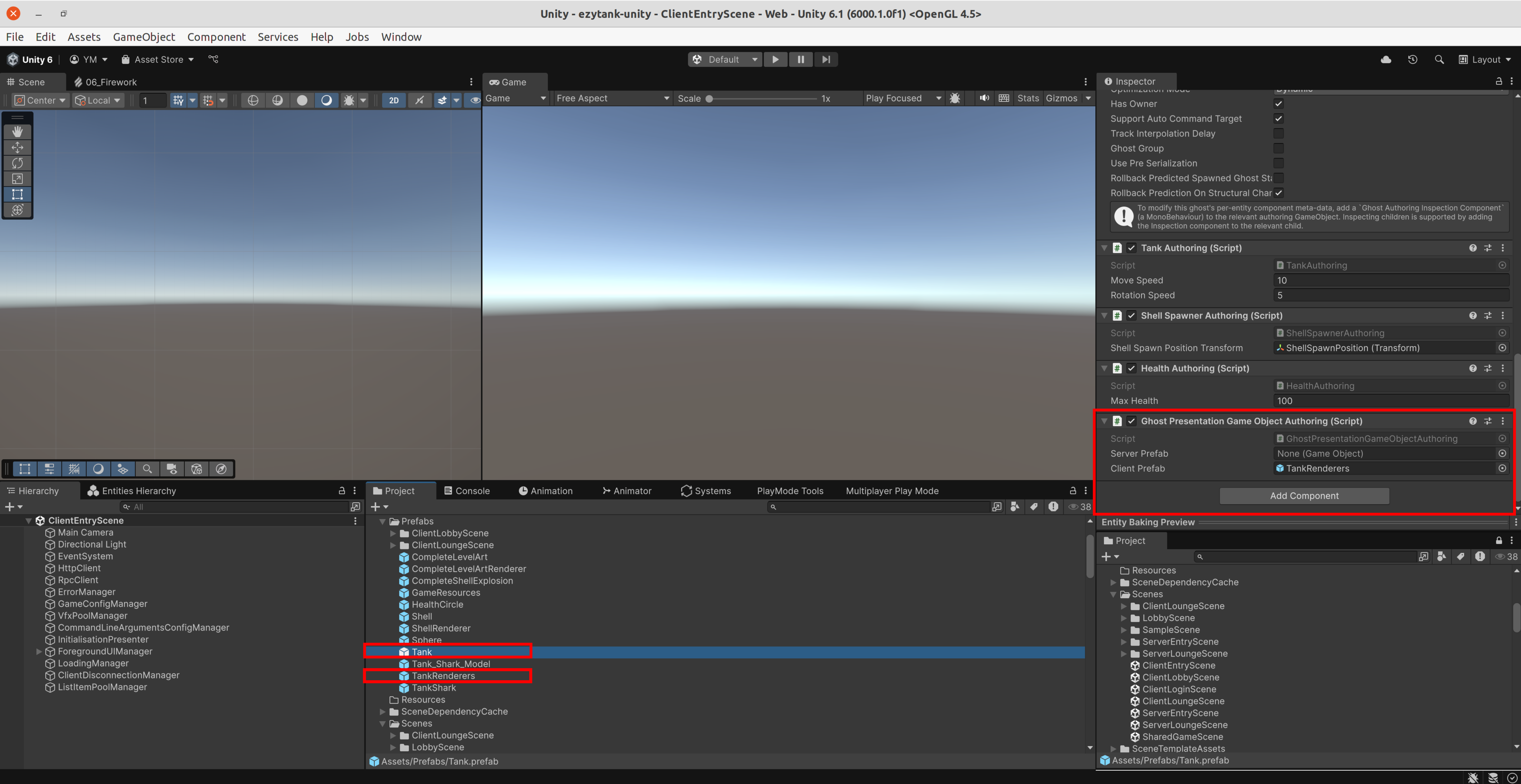 Ở đây prefab
 Tankdùng để tạo entity dùng cho việc đồng bộ mô phỏng giữa client và server, do đó nó chứa các components nhưTankAuthoringvàGhostAuthoringComponent. Ngược lại, prefabTankRenderschỉ gồm các game objects để hiện thị xe tăng ở máy người chơi, do đó chứa thành phầnTransform,MeshFiltervàMeshRenderer. Đóng vai trò cầu nối là componentGhostPresentationGameObjectAuthoringđể tự động đồng bộ mô phỏng và hiển thị. Giải thích cơ chế khởi tạo và đồng bộ tự động:GhostPresentationGameObjectSystem(client) phát hiện entity ghost chưa có GameObject → tự tạo prefab.CopyTransformToGameObjectSystemmỗi frame sao chépLocalToWorld(vị trí, hướng) từ entity sangTransformcủa GameObject → Không cần viết code cập nhật thủ công.
- Hủy và dọn dẹp: Khi entity bị xóa (ví dụ lúc tank nổ),
DelayedDespawnSystembỏ component tham chiếu prefab. Hệ thống sẽ hủy luôn GameObject tương ứng tránh để thừa trong scene.[WorldSystemFilter(WorldSystemFilterFlags.ServerSimulation | WorldSystemFilterFlags.ClientSimulation)] [UpdateInGroup(typeof(SimulationSystemGroup))] public partial struct DelayedDespawnSystem : ISystem { ... public void OnUpdate(ref SystemState state) { DelayedDespawnJob job = new DelayedDespawnJob { ... }; state.Dependency = job.Schedule(state.Dependency); } public unsafe partial struct DelayedDespawnJob : IJobEntity { ... void Execute(Entity entity, ref DelayedDespawn delayedDespawn) { ... if (delayedDespawn.hasHandledPreDespawnClient == 0 && !isServer) { // Dispose tank renderer if (gameObjectPrefabReferenceLookup.TryGetComponent(entity, out var gameObjectPrefabReference)) { ecb.RemoveComponent<GhostPresentationGameObjectPrefabReference>(entity); } ... } } } }