
Hiển thị Particle Systems trong Unity Netcode for Entities
Back to ezytankTrong game EzyTank, khi đạn pháo (shell) phát nổ, ta cần hiển thị hiệu ứng nổ mượt mà, không bị giật lag và không tạo quá nhiều đối tượng thừa thãi trong bộ nhớ.
Vì EzyTank sử dụng Unity Netcode for Entities, hầu hết logic gameplay được xử lý trong ECS world. Tuy nhiên, các yếu tố hiển thị như Particle System vẫn thuộc về GameObject world, vì chúng dựa vào
MonoBehaviour, Transform, và ParticleSystem, những API này không thể sử dụng trực tiếp trong code ECS thuần.Vì vậy, để hiển thị hiệu ứng như vụ nổ trong game, ta cần một cơ chế kết nối giữa ECS và GameObject world.
Sử dụng ParticleSystem để cài đặt hiệu ứng nổ
Lấy sự kiện đạn pháo phát nổ làm ví dụ, hiệu ứng nổ này được tạo bằng component
ParticleSystem được thêm vào trong một prefab CompleteShellExplosion như sau: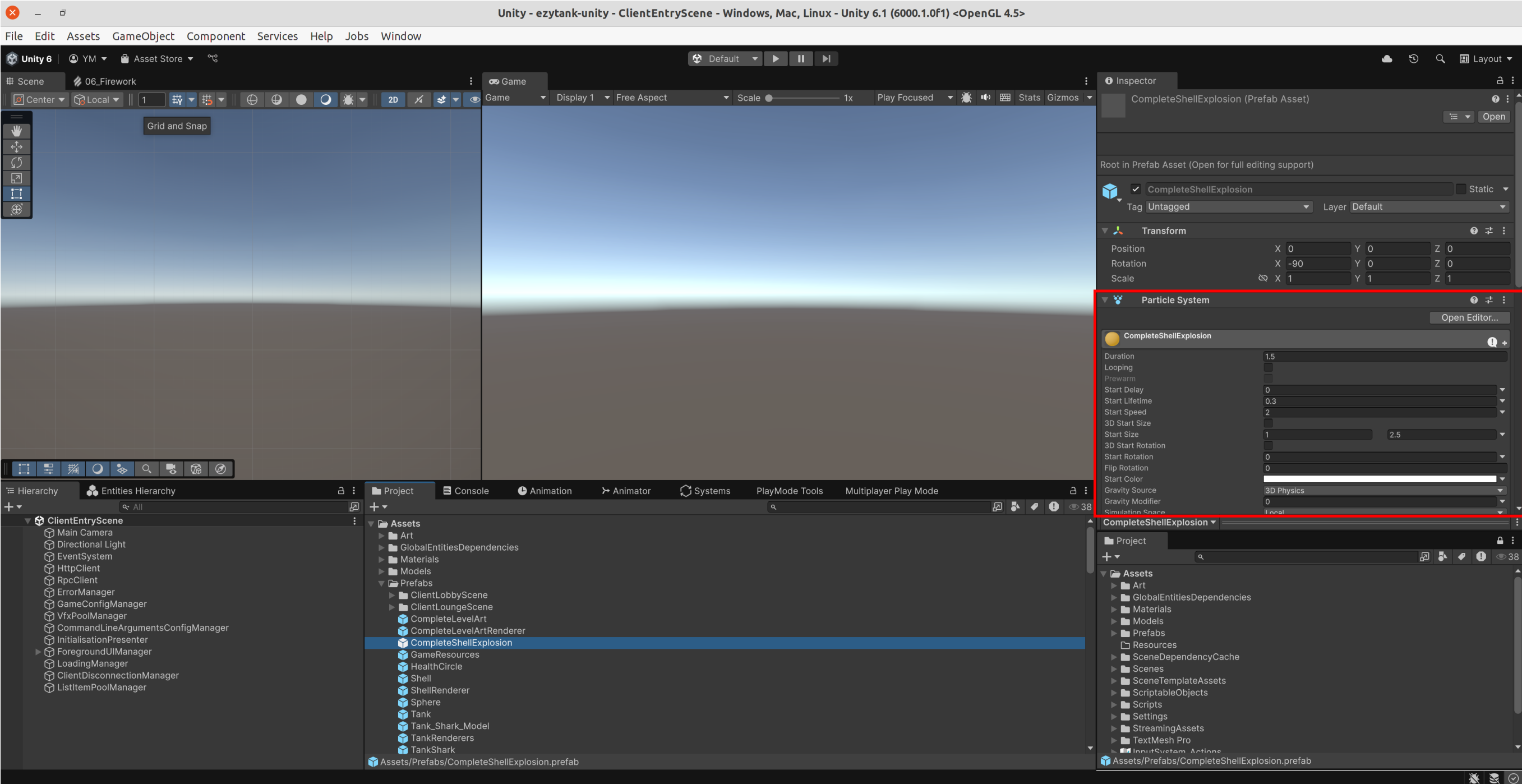
Prefab
CompleteShellExplosion sẽ được dùng làm mẫu để sinh ra các vụ nổ khi trò chơi chạy. Tuy nhiên, việc khởi tạo liên tục các GameObject mới dựu trên mẫu này mỗi khi có vụ nổ sẽ tốn tài nguyên, vì vậy ta cần một Object Pool, tức là một bộ chứa các đối tượng được tạo sẵn để tái sử dụng thay vì tạo mới mỗi lần.Sử dụng Object Pool để tối ưu hiệu năng khi tái sử dụng ParticleSystem
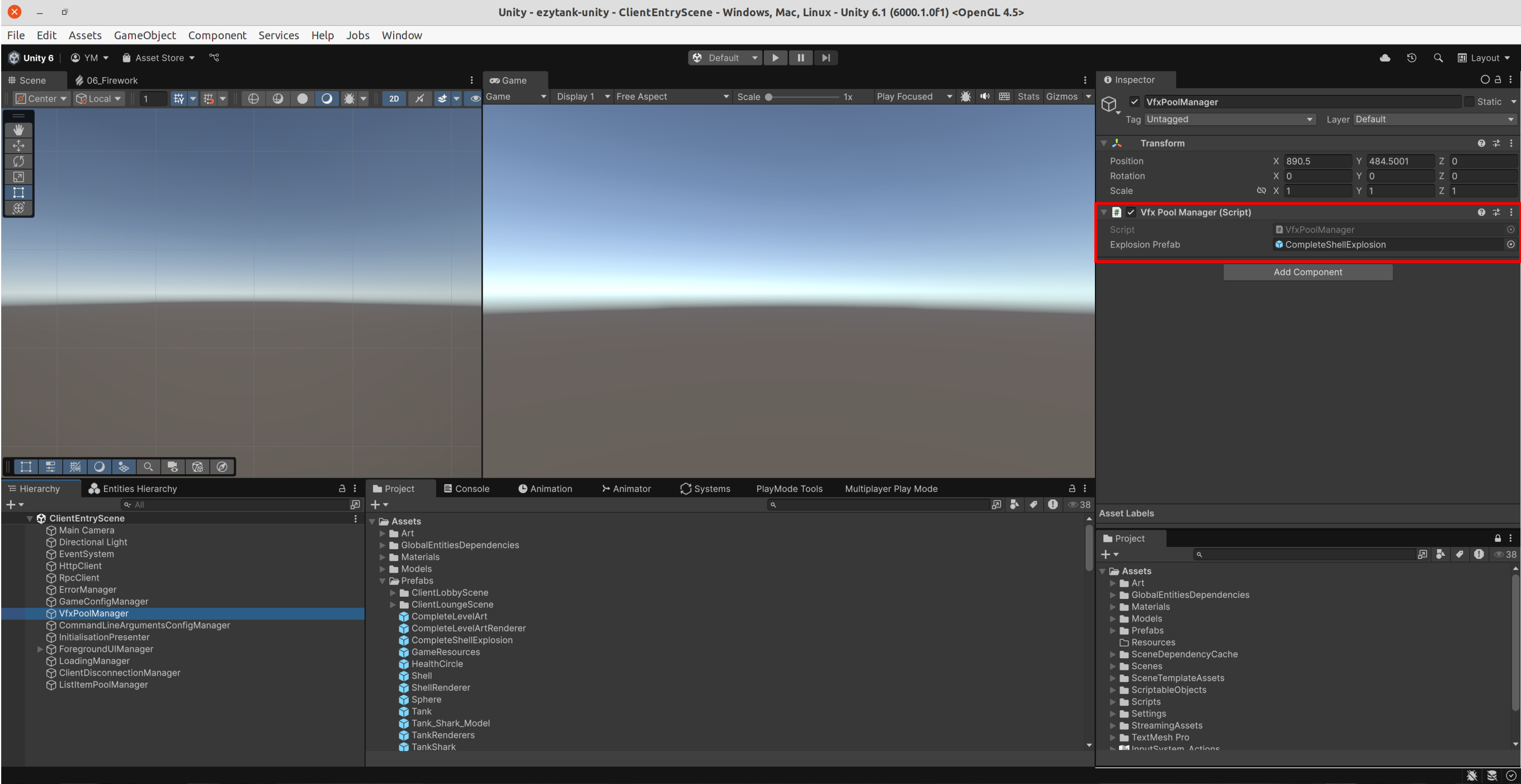
Object pooling là một kỹ thuật nhằm tái sử dụng các đối tượng thay vì tạo và hủy chúng liên tục. Trong EzyTank, ta sử dụng lớp
VfxPoolManager để quản lý các đối tượng tạo sẵn của hiệu ứng nổ:using UnityEngine; using UnityEngine.Pool; namespace Youngmonkeys.EzyTank { public class VfxPoolManager : SingletonMonoBehaviour<VfxPoolManager> { public GameObject explosionPrefab; private ObjectPool<GameObject> mPool; protected override void Awake() { base.Awake(); mPool = new ObjectPool<GameObject>( createFunc: () => Instantiate(explosionPrefab), actionOnGet: obj => obj.SetActive(true), actionOnRelease: obj => obj.SetActive(false), actionOnDestroy: Destroy, collectionCheck: false, defaultCapacity: 10, maxSize: 100 ); } public GameObject Get() { return mPool.Get(); } public void Release(GameObject obj) { mPool.Release(obj); } } }
Với lớp này, khi có vụ nổ mới, ta chỉ cần lấy (gọi hàm
Get()) một đối tượng từ pool thay vì khởi tạo mới, và sau khi hiệu ứng kết thúc, ta trả lại (gọi hàm Release()) nó cho pool. Điều này giảm đáng kể chi phí CPU và bộ nhớ, đặc biệt khi trong trò chơi có nhiều vụ nổ xảy ra liên tục.Hệ thống ECS hiển thị hiệu ứng nổ
Trong ECS world của Ezytank, việc hiển thị hiệu ứng được xử lý thông qua request-based pattern, gồm ba phần chính:
Lớp VfxHitRequest định nghĩa dữ liệu cho một yêu cầu hiển thị hiệu ứng nổ
public struct VfxHitRequest : IComponentData
{
	public Vector3 position;
	public float hitRadius;
}
Khi một đạn pháo va chạm, hệ thống sẽ tạo một entity mới chứa
VfxHitRequest để yêu cầu hiển thị vụ nổ tại vị trí đó.Lớp ShellHitVfxRequestSystem tạo yêu cầu hiển thị hiệu ứng nổ khi đạn va chạm
Hệ thống này chạy chỉ chạy ở phía client (
[WorldSystemFilter(WorldSystemFilterFlags.ClientSimulation)]), và liên tục kiểm tra các đạn pháo đã va chạm hay chưa (điều kiện hasHit == 1). Khi phát hiện va chạm, nó tạo một entity mới có dữ liệu VfxHitRequest, mô tả vị trí và bán kính vụ nổ.[UpdateInGroup(typeof(PredictedSimulationSystemGroup))] [WorldSystemFilter(WorldSystemFilterFlags.ClientSimulation)] public partial struct ShellHitVfxRequestSystem : ISystem { public void OnCreate(ref SystemState state) { state.RequireForUpdate<BeginSimulationEntityCommandBufferSystem.Singleton>(); state.RequireForUpdate( SystemAPI.QueryBuilder() .WithAll<LocalTransform, ShellShotVisual, Shell>() .Build() ); } public void OnUpdate(ref SystemState state) { var job = new ShellHitVfxRequestJob { entityCommandBuffer = SystemAPI.GetSingleton<BeginSimulationEntityCommandBufferSystem.Singleton>() .CreateCommandBuffer(state.WorldUnmanaged) }; state.Dependency = job.Schedule(state.Dependency); } public partial struct ShellHitVfxRequestJob : IJobEntity { public EntityCommandBuffer entityCommandBuffer; void Execute( Entity entity, in LocalTransform transform, ref ShellShotVisual shellShotVisual, in Shell shell ) { if (shellShotVisual.hasProcessedHitVfx == 0 && shell.hasHit == 1) { Entity spawnVfxHitShellRequestEntity = entityCommandBuffer.CreateEntity(); entityCommandBuffer.AddComponent( spawnVfxHitShellRequestEntity, new VfxHitRequest { position = transform.Position, hitRadius = shellShotVisual.damageRadius, } ); shellShotVisual.hasProcessedHitVfx = 1; } } } }
Lớp HitVfxSystem xử lý hiển thị hiệu ứng nổ
Hệ thống này chịu trách nhiệm xử lý yêu cầu hiển thị hiệu ứng nổ như sau:
- Lấy đối tượng hiệu ứng nổ từ
VfxPoolManager - Đặt đối tượng hiệu ứng nổ tại đúng vị trí va chạm
- Kích hoạt hiệu ứng nổ bằng cách gọi
ParticleSystem.Play() - Xóa entity ứng với yêu cầu hiển thị yêu ứng nổ sau khi hiển thị xong
using Unity.Entities;
using UnityEngine;
using Object = UnityEngine.Object;

namespace Youngmonkeys.EzyTank
{
	/// <summary>
	/// This system plays the Vfx.
	/// It is in charge of creating the <see cref="ParticleSystem"/> instances associated with the requests
	/// and triggering them when required.
	/// </summary>
	[WorldSystemFilter(WorldSystemFilterFlags.ClientSimulation)]
	[UpdateInGroup(typeof(SimulationSystemGroup), OrderLast = true)]
	public partial class HitVfxSystem : SystemBase
	{
		protected override void OnCreate()
		{
			RequireForUpdate<VfxHitRequest>();
		}

		protected override void OnUpdate()
		{
			var ecb = SystemAPI.GetSingletonRW<BeginSimulationEntityCommandBufferSystem.Singleton>().ValueRW
				.CreateCommandBuffer(World.Unmanaged);
			foreach (var (hitVfxRequest, entity) in SystemAPI.Query<RefRO<VfxHitRequest>>().WithEntityAccess())
			{
				GameObject explosionGameObject = VfxPoolManager.Instance.Get();
				explosionGameObject.transform.position = hitVfxRequest.ValueRO.position;
				ParticleSystem explosionParticles = explosionGameObject.GetComponent<ParticleSystem>();
				explosionParticles.Play();

				// Once the particles have finished, destroy the gameObject they are on.
				ParticleSystem.MainModule mainModule = explosionParticles.main;
				Object.Destroy(explosionParticles.gameObject, mainModule.duration);

				ecb.DestroyEntity(entity);
			}
		}
	}
}
Vì sao HitVfxSystem kế thừa SystemBase thay vì ISystem
Khái niệm
-
ISystemlà kiểu unmanaged system, nó được viết như struct, chạy thuần trong môi trường ECS, tối ưu hiệu năng và thường dùng cho logic dữ liệu (chẳng hạn xử lý component, tính toán, cập nhật dữ liệu) -
SystemBaselà kiểu managed system, nó là class, cho phép tích hợp linh hoạt hơn với các API Unity (ví dụ GameObject, MonoBehaviour, Object.Destroy...)
Trong trường hợp HitVfxSystem của EzyTank
- Tương tác với GameObject/MonoBehaviour:
HitVfxSystemphải gọiVfxPoolManager.Instance.Get(), nhận về mộtGameObjectchứa thành phầnParticleSystem, sau đó gọiPlay(), tức là đang tương tác với các thành phần bên ngoài ECS world. Những API này không thể được gọi trong mộtISystem. - Gọi
Object.Destroyhoặc các hàm của góiUnityEngine: khi hiệu ứng kết thúc,HitVfxSystemgọi đếnObject.Destroy(...)để hủy hoặc trả đối tượng về pool. Những lệnh này cũng không chạy được trongISystem. -
SystemBasecho phép kết hợp giữa ECS world và các đối tượng/hiệu ứng bên ngoài ECS world. Vì vậy, với những hệ thống cần giao tiếp linh hoạt giữa logic ECS và các thành phần Unity truyền thống,SystemBaselà lựa chọn phù hợp hơn.
Tóm tắt quy trình hiển thị hiệu ứng nổ
Luồng xử lý hiển thị hiệu ứng nổ:
- Khi đạn pháo va chạm,
ShellHitVfxRequestSystemphát hiện và tạo một entity chứa VfxHitRequest - Hệ thống
HitVfxSystemnhận request, lấy đối tượng hiệu ứng từVfxPoolManager, và bắt đầu hiển thị hiệu ứng - Khi hiệu ứng hoàn tất, đối tượng hiệu ứng được trả lại pool
Ưu điểm của cách này:
- Duy trì hiệu suất cao trong ECS world
- Kết hợp linh hoạt dữ liệu ECS thuần và hiệu ứng GameObject
- Tránh việc tạo/hủy GameObject liên tục trong runtime